Hot Todays

Ubuntu Release Schedule Updated 11.04


http://bojalinuxer.blogspot.com

11:04 Ubuntu - Canonical decided to reschedule the release of Ubuntu 11:04 (Natty Narwhal). This we can know through the Ubuntu wiki. Natty Narwhal planned to attend our center in April 2011.
Earlier it was scheduled, Ubuntu 4.11 Alpha release will be through 5, a beta and release candidate releases, Canonical now has turned it into 3 release an alpha, a beta release and release candidate. First alpha release will be pushed backward to 2 December this year previously scheduled for release November 4. Here are the new Ubuntu release schedule 11:04 more:
  • December 2, 2010 - Alpha 1 release;
  • February 3, 2011 - Alpha 2 release;
  • March 3, 2011 - Alpha 3 release;
  • March 31, 2011 - Beta release;
  • 21 April 2011 - Release Candidate;
  • 28 April 2011 - Final release of Ubuntu 11.04.
Expected 11:04 Ubuntu comes with bringing the latest Gnome desktop environment, Gnome 3.0 that promises a lot of changes from previous versions. Ubuntu 11:04 (Natty Narwhal) to release the 14th of the Ubuntu operating system. This will bring support for multi-touch technology, improved artwork, better hardware support and compatibility with ARM.

http://bojalinuxer.blogspot.com

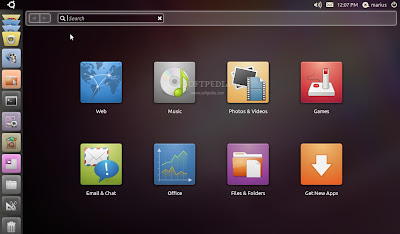
Ubuntu development team is concentrating all abilities to improve the Unity shell and for a better integration with the Gnome desktop environment. Unity in the future will also become part of the Ubuntu desktop version.
Canonical will increase uTouch and multi-touch gesture stack by introducing support for hardware components and devices more. Ubuntu Software Center also will support a donation for different software applications.

Source: softpedia.com

Release Update KDE 4.5.3


KDE 4.5 - KDE has released the latest update. KDE 4.5.3 is a minor update, focusing on bug fixes and stability issues. This release includes fixes and updates the shared data cache is ocular in KDE the default document viewer and file manager Dolphin.
"KDE has released a series of updates to Plasma Desktop and Netbook workspaces, KDE and KDE applications platform. This update is the third in a series of monthly updates to the series stabilization 4.5", said the official announcement. "As a release which contains only bug fixes and translation updates, it will be updated a safe and enjoyable for  everyone. KDE SC 4 has been translated into over 55 languages, and there will be more in the future", so added.The next update fixes bugs, KDE 4.5.4, is expected to be present on 30 November next. The next major release, KDE SC 4.6, is not expected until next year and is scheduled to be released on January 26, 2011. For users of Ubuntu / Kubuntu want upadating or using KDE 4.5.3 to refer to how to install KDE 4.5. For those of you who want to install KDE 4.5.3 using the source code, can download it here. 

Source: softpedia.com

Activation windows 7 genuine

What is Windows activation?

Activating a Windows 7 installation is in a way registering Windows 7 operating system of yours and making it legal.

Why activating Windows 7 is important?

Microsoft operating systems had this feature on Windows Vista editions as well as on Windows 7 editions with different Windows 7 Build 's until its RTM release is published. And windows activation which is not completed in the given period of time disables some Windows features and prevents you to use all properties of your system after the activation period. Also you may not be able to update your system with the recent product updated from Microsoft. So to make sure that you can benefit from all the feaures and enhancements of your Microsoft Windows 7 RC system, give importance to activate Windows7 as early as possible. If you have already tried to activate Windows 7 copy, but failed and getting "This copy of Windows 7 is not genuine" warning then you can refer to Windows 7 troubleshoot article Windows 7 Activation - This copy of Windows 7 is not genuine for possible solution suggesstions.

How to Activate Windows 7 manually ?

If you did not activate Windows 7 during your Windows 7 installation, you can start activating Windows 7 manually. You can see for Windows 7 activation you have limited time to complete activating Windows 7 installation. You can see how much time remaining for you to activate Windows7 for different Windows 7 Build numbers when you open the System control panel screen at the bottom of the panel view. 
To open the below System Control Panel screen, you can open the Control Panel, then select System and Security menu item and select the System control panel view. If you have not activated Windows 7 RC (Release Candidate) Ultimate Edition after you have installed your Windows 7 operating system, you will see the Windows activation section at the botom of the Control Panel screen. When you have an online internet connection, you can start activating Windows process manually by clicking the "Activate Windows now" link.

System and Security - System Control Panel - Windows Activation

On the Windows Activation screen in order to activate Windows 7 Build 7000 for instance, you are reminded how many days are there still for activating Windows 7 Ultimate RC operating system. Activating Windows 7 will enable you to use all Windows features after the activation period is ended. So to make sure, if you have an active online internet connection, go on for next steps by selecting the option "Activate Windows online now".

Activate Windows online now

This screen displays the message to the user about the product key is being veried. So if the activation can connect to Microsoft via internet connection and manages to validate the product key without any problem you will be redirected to the last screen of the Windows Activation wizard. This is the activation step the question of "How to register Windows 7" is answered. If the system can not reach to the internet due to network errors or a valid internet connection, you will be prompted to define and build an internet connection.

windows7-activation

In the below screen you can see the result of a successful activation. It is stated that your copy of Windows is verified and with a valid copy of Windows 7, you are eligible to recieve all available updates and product support from Microsoft.

windows7-activation-is-successful
As you can see in the above explained steps Windows 7 activation is simple and straight-forward unless you have a valid copy of Windows 7. Generally you will not face a problem during Windows 7 activation of your Windows copy. If you experience a problem while trying to register Windows 7, then you can call the Microsoft Support phones or start activation using phone procedure and talk to a support engineer to help you with your Windows 7 activation problem.

Free Activation Windows XP


When you have installed windows XP and try to aftifate you get messages like “your product key is not genuine or the number of atcivation has been exceeded” and then it tells you to call Microsoft to get the key. Instead of going through this trouble to get a new genuine product key, solve this problem by following these steps: ps:

STEPS:

*
Click on Start
*
Find and Click “Run”
*
Type regedit
*
Click the plus next to “HKEY_LOCAL_MACHINE”
*
Click the plus next to “SOFTWARE”
*
Click the plus next to “Microsoft”
*
Click the plus next to “Windows NT”
*
Click the plus next to “CurrentVersion”
*
Click “WPAEvents”
*
On the right panel, find “OOBETimer” then double click it.
*
Now, Delete all the Values by highlighting it, then delete it
*
Then type in this value without the quotation mark “FF D5 71 D6 8B 6A 8D 6F D5 33 93 FD”
*
Then after that click OK,
*
Then on the left panel right click WPAEvents, then click on permissions
*
Then click System or SYSTEM, then Deny Full Control, then Click OK.
*
Then Exit Registry Editor.
*
To Verify that it works, go to start, then “aktivate windows”, or go to start, then all programs, then “aktivate windows”. Or go to the Start menu, click Run.

Type: oobe/msoobe /a

Then click OK.

Download Kaspersky 2011 Full Version

The Kaspersky team has released Kaspersky Internet Security 2011 and Kaspersky Anti-Virus 2011 activation offline or using a serial code. You can make Kaspersky Internet Security 2011 and Kaspersky Anti-Virus 2011 which is still TRIAL become full version with slightly TRICKS.
 
Please Download first TRIAL Kaspersky Internet Security 2011 or Kaspersky Anti-Virus 2011 TRIAL here. Then select the Kaspersky license manager at the bottom right corner. Remove trial license, by clicking on the red cross button.
 
Then you will see two options, select "Activate the application with a new license." After that turning off your internet connection and then enter the code:
T1JVS-NNMBD-K1QTN-SUBP8. T1JVS-NNMBD-K1QTN-SUBP8.
  
Click Next, then pop up an error will appear as shown below. “Activation error: Cannot set up server connection”. "Active Error". Click Ok.


Download the latest update file key here. Many who try the trick above does not work anymore, maybe a trial software that has now been repaired gap, Whereas previously tested with this trick can directly Please try to download kaspersky trial here. 

Hopefully helpful

Good luck

License Kaspersky 2011 Update to 2020 Sucsess 100 %


This product allows you to edit any data license key. It is a continuation development of the Blacklist Exploits. You can change the basic parameters of the key: i.e. creation date, expiration date, time, number of licenses and so forth. Keygen generated on the basis of previous data and is unique for each machine. This means that the key would never fall into the blacklist and will work as long as you need. Basically .. this Patch allows you to edit Kaspersky keys. Thus enabling you to extend the life of any Key for as long as you want :P

01. Open Kaspersky > Go into "Settings" > install provided "CitySkin".
    (*IMPORTANT*: "CitySkin" enables the "Install Key File" option)
02. In "Settings" > Disable "Self-defense" and "Protection".
03. Delete all Keys
04. Close Kaspersky > right-click Kaspersky's tray icon and exit
05. Copy the 2 Patch files that match your Kaspersky version.
06. Paste into Kaspersky's installation directory
    (C:\Program Files (x86)\Kaspersky Lab\Kaspersky Internet Security 2011)
    (C:\Program Files\Kaspersky Lab\Kaspersky Internet Security 2011)
07. Start Kaspersky
08. Enable "Self-defense" and "Protection".
09. Install any Key
    (the information is in the ".ini" file, so any key will work)
    (you can edit the ".ini" so the key can last as long as you like)
10. Restart Computer > then Update Kaspersky
    (Important to Restart for Patch to take effect)
11. Set Kaspersky to "Ask What To Do"
    (Or you can use my provided Settings)
12. After restarting .. wait for Kaspersky's "Hacktool.Kiser" alert > then add
    to "Exlusions" list...
13. Complete.. you can now update Kaspersky and set it up to your liking . .


Back To Top ◆